.svg "ConversionCrew_color (1)")
.svg "ConversionCrew_white (1)")

At Conversion Crew, we know better than anyone how quickly HubSpot continues to evolve. New features, improvements, and product updates follow each other in rapid succession. To ensure that you always stay informed about the developments that really make a difference, we will now share a monthly overview of the most important HubSpot updates. This way, you can effortlessly stay up to date and get the most out of your HubSpot environment!

Overview:
Update 1: Sunset: Legacy Standard SandboxUpdate 2: Support for multiple teams in HubSpot
Update 3: Remove specific values from multi-checkbox properties via workflows
Update 4: How to better manage and recognize spam in HubSpot Forms?
Update 5: Help Desk Spaces and Custom Views now available for Pro+ users
Update 6: How to make your Customer Agent smarter and test your email responses more effectively?
Update 7: How to track followers of your LinkedIn Personal Accounts in HubSpot?
Update 8: How to add Custom and Cross-Object Reports to CRM records?
Update 9: Use formula fields in Custom Report Builder
Update 10: How to track the progress of companies through lifecycle stages?
Update 1: Sunset: Legacy Standard Sandbox
On March 16, 2026, HubSpot will discontinue the Legacy Standard Sandbox. If you’re currently using a legacy sandbox and don’t migrate in time, you’ll lose access after that date. In practice, this means that test environments, integration testing, and release preparation could suddenly come to a halt.
If you’d like to discuss this with us, feel free to get in touch. We can then clearly outline the impact for your setup and advise on the best migration path.
Update 2: Support for multiple teams in HubSpot
HubSpot now allows users to be fully functional members of multiple teams at the same time. This means that team members have equal rights within all their teams for routing, workflows, and reporting, without being limited to one main team.
Why this is important
Many organizations work with teams across regions, departments, or roles. Previously, users could only participate fully in one team, which caused confusion and inefficient task distribution. With this update:
-
All team members participate in routing rules and workflows
-
Work is distributed more fairly and predictably
-
Teams work together more efficiently, even in matrix structures
-
The distinction between “main” and “extra” teams disappears
-
In short: more flexibility, less management, and consistent routing.
How it works
The team model in HubSpot has been simplified and now consists of two parts:
-
Teams: Users can be members of multiple teams, all with full functionality. All team members are included in workflows, Help Desk routing, and meeting round robins.
-
Default Team: Each account retains one Default Team per user. This team determines personal settings such as record views, notifications, and the default homepage.
Please note: if you use a team in a routing rule, all members of that team will now receive work. Therefore, check your team structure to avoid surprises. Inbox-based automatic assignment is not included in this update for the time being.
Availability
Professional Customer Platform & Enterprise Customer Platform
Update 3: Remove specific values from multi-checkbox properties via workflows
HubSpot is expanding the Edit Record workflow action with a new option: you can now remove specific values from a multi-checkbox property without clearing the entire field. This allows you to selectively modify lists within workflows.
Why this is important
The Edit Record action is one of the most powerful workflow actions in HubSpot. Until now, with multi-checkbox properties, you often had to delete and rebuild all values to remove just a few options. This resulted in:
- Unnecessarily complex workflows
- A higher chance of errors
- Extra maintenance and logic
With this update, you can keep your workflows simpler and your CRM data accurate, without cumbersome workarounds.
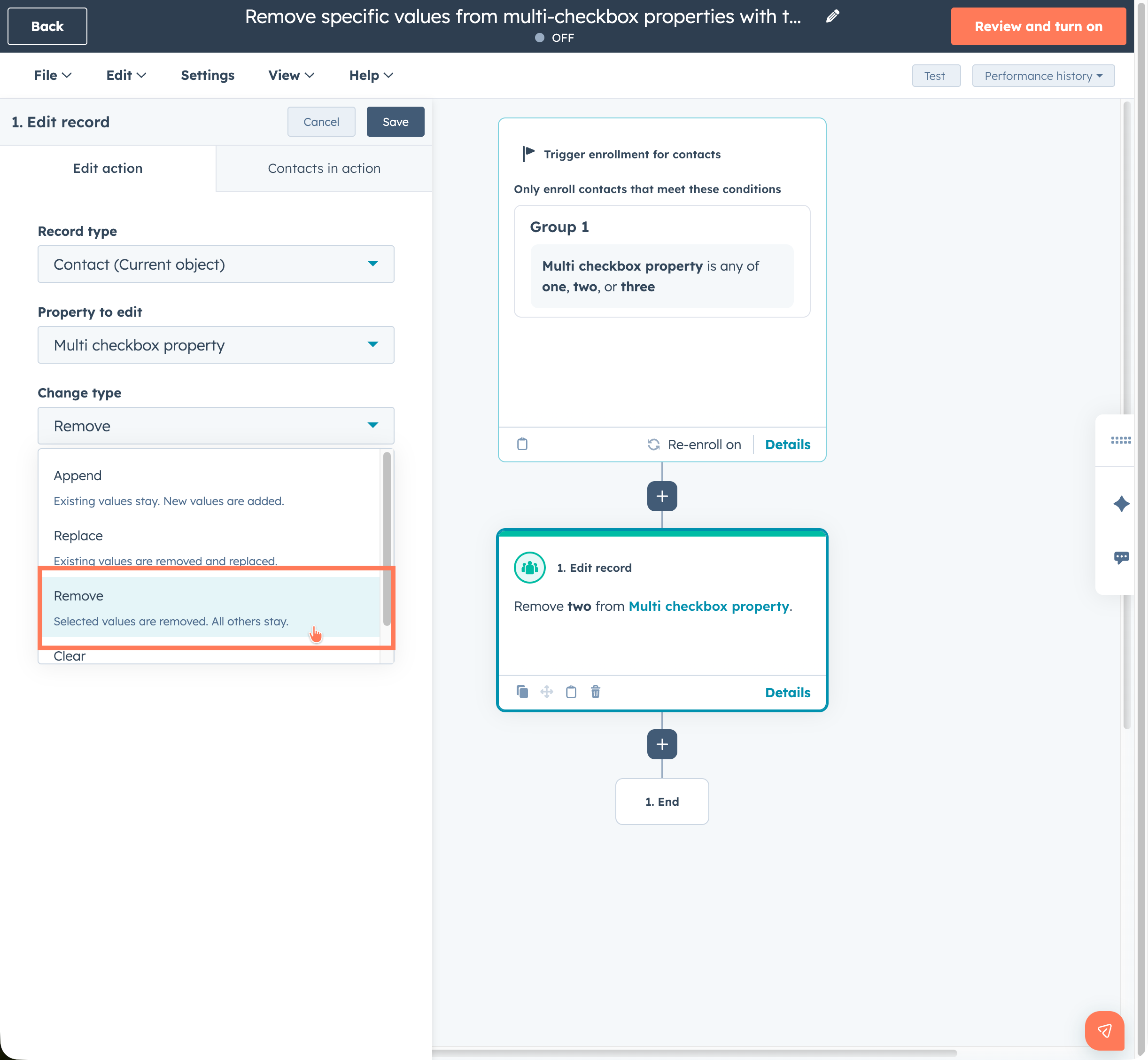
How it works
- Add the Edit Record action to your workflow.
- Under Property to edit, choose a multi-checkbox property.
- Under Change type, select the new option Remove.
- Choose the specific values you want to remove from the field.
The other selected values are automatically retained.
HubSpot makes celebrating successes even more fun! From now on, you'll see confetti on the screen when a deal is won. This way, every closed success is immediately celebrated visually.

Avalibility
Professional & Enterprise Customer Platform
Marketing, Sales, Service, Data en Smart CRM (Pro & Enterprise)
Update 4: How to better manage and recognize spam in HubSpot Forms?
HubSpot is improving the way spam submissions are displayed and managed in forms. Spam is now easier to find, understand, and clean up immediately.
Why this is important
Spam submissions were often difficult to locate and assess. With this update, you can quickly assess the severity of spam and take more targeted action, saving time and keeping your data cleaner.
How it works
Per form: Go to Marketing > Forms and open a form. In the new Spam tab, you'll see spam insights, blocked submissions, and actions to view, release, or (bulk) delete submissions.
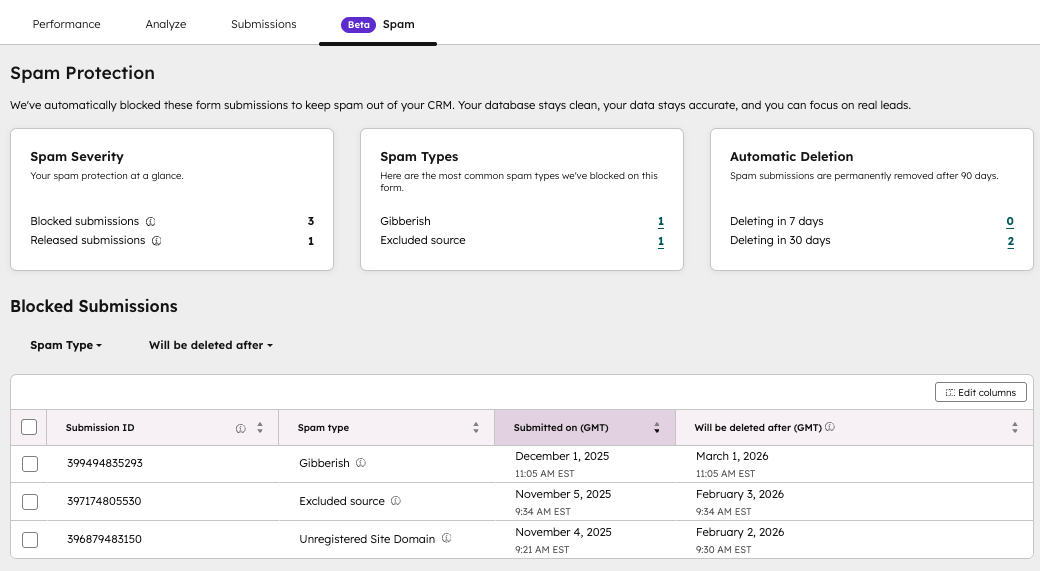
About all forms: Go to Marketing > Forms > Analyze and open Spam submissions to view, filter, and perform (bulk) actions on spam across all forms.
In addition, spam protection settings such as Bot Filtering and reCAPTCHA are now directly accessible from the form details.
Availability
All hubs & tiers
Update 5: Help Desk Spaces and Custom Views now available for Pro+ users
HubSpot is expanding the functionality of Help Desk by making Spaces and Custom Views available to Service Hub Pro+ customers and giving users with Account Access more control over managing these tools.
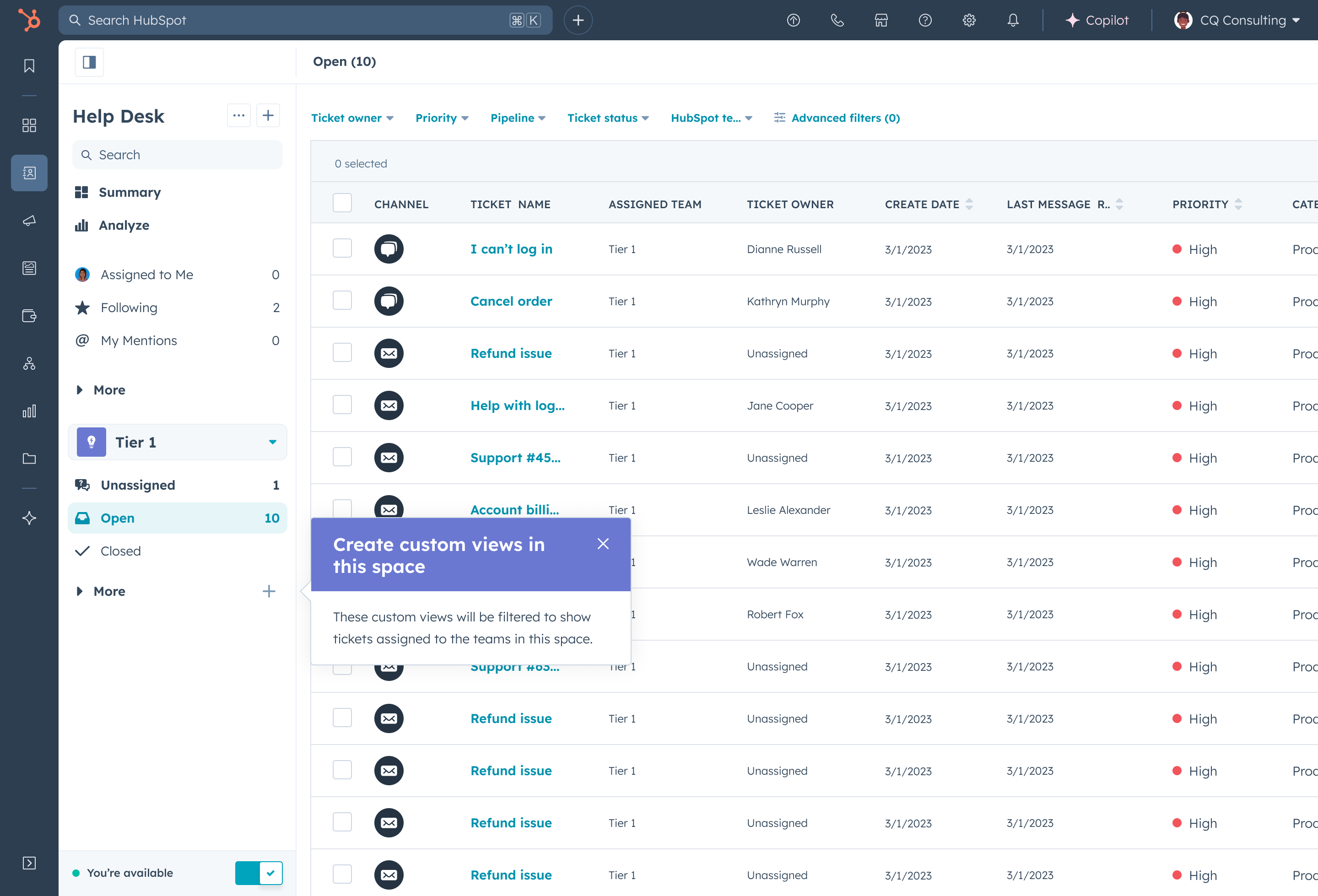
- Help Desk Spaces: Previously only available to Enterprise customers, Spaces are now also accessible to Pro tier customers. Spaces provide a team-based workspace where tickets are centrally organized and can be managed efficiently.
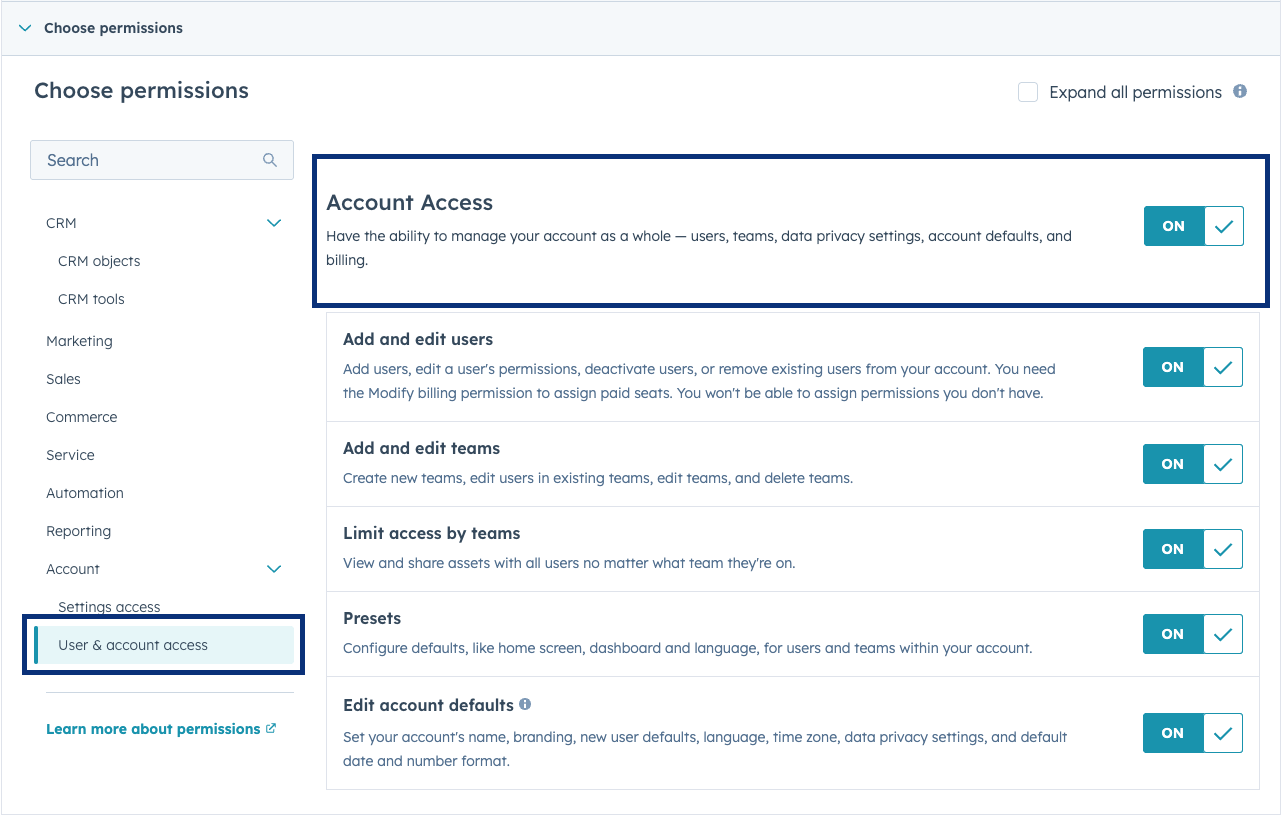
- Managing Custom Views & Spaces: Users with Account Access (admin-based) can now configure Spaces and custom views themselves, without every change having to go through a Super Admin.
Why this is important
- More support teams can organize and resolve tickets faster.
- Team leads and frontline managers gain autonomy to customize their workspace without bottlenecks.
- Helps improve focus, efficiency, and overview within teams.
How it works
- Spaces: A Service Seat is required to access. Admins create and manage Spaces in the help desk settings, while agents can switch between Spaces instantly. Tickets are automatically assigned to the appropriate Space based on team members.
- Custom Views & Account Access: Users with Account Access can get access rights to manage views and Spaces via Users & Teams. Custom view permissions must be enabled to make changes.
Availability
Service Hub Pro and Enterprise (Service Seat required)
Update 6: How to make your Customer Agent smarter and test your email responses more effectively?
Did you know that your Customer Agent is now faster, more accurate, and easier to test? With this update, you can not only preview email responses, but your agent can also use structured data to answer customer questions. This makes your agent a lot smarter and more customer-focused.
- How do you view the entire email conversation from customer question to response?
- What knowledge sources does your agent use when answering questions?
- How do you manually add actions, handoffs, or knowledge base articles to improve answers?
- Can you test different scenarios without having an email channel linked?
- How can your agent now use structured data from CSV, JSON, or XML to provide immediate, accurate answers about inventory, prices, or SKUs, for example?
Why is this important?
Email requires well-formulated, complete answers. At the same time, your most valuable information often lives in spreadsheets and tables. Now your agent can:
- Provide professional email responses and test them before they go live
- Instantly leverage your data for accurate product and pricing information
- Answer recurring questions faster and more consistently
- Convert more customers thanks to fewer misunderstandings and faster responses
How it works
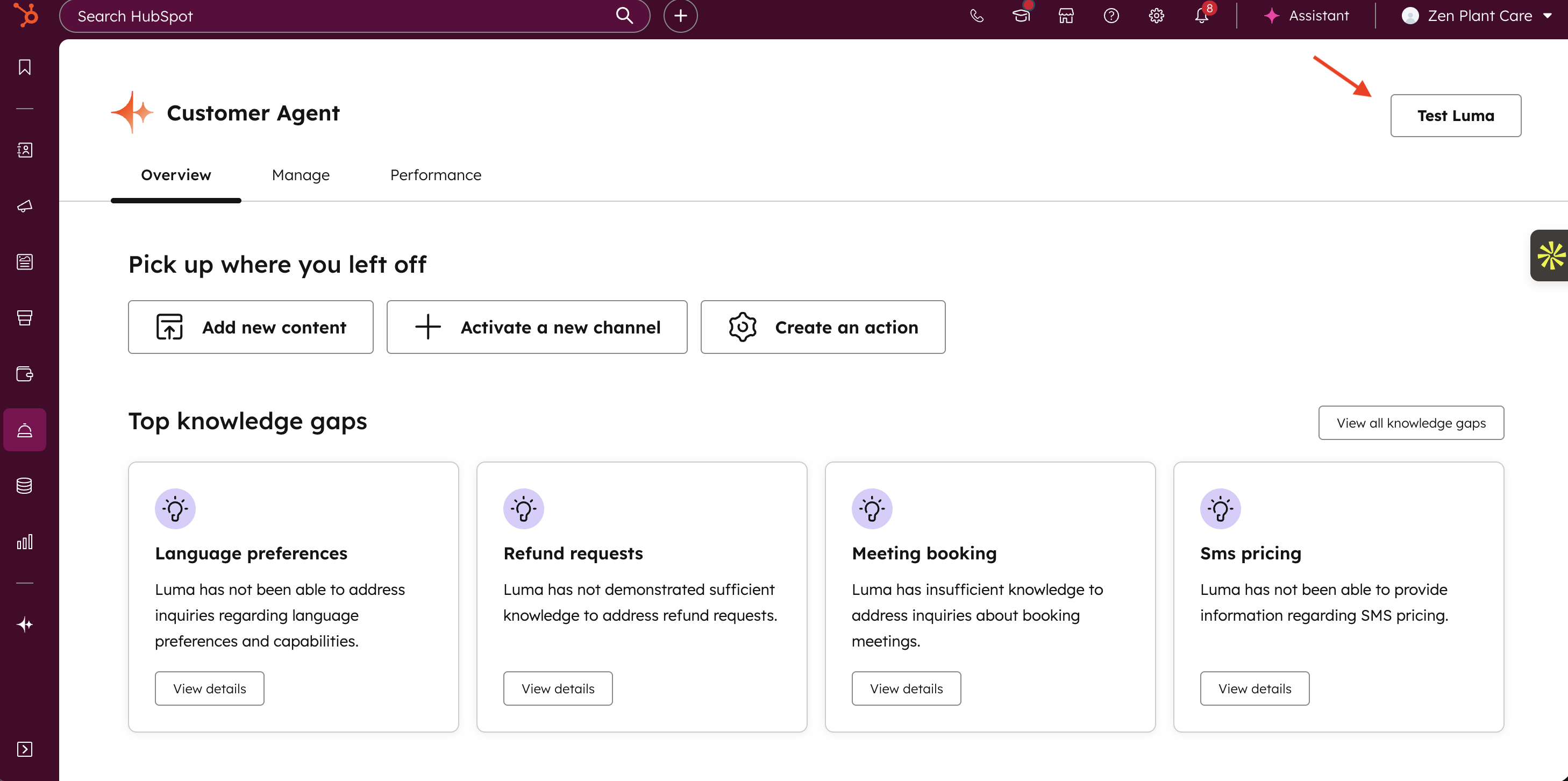
- Go to your test environment via the overview page or a Customer Agent tab by clicking on “Test [Name of your Customer Agent]” in the top right corner
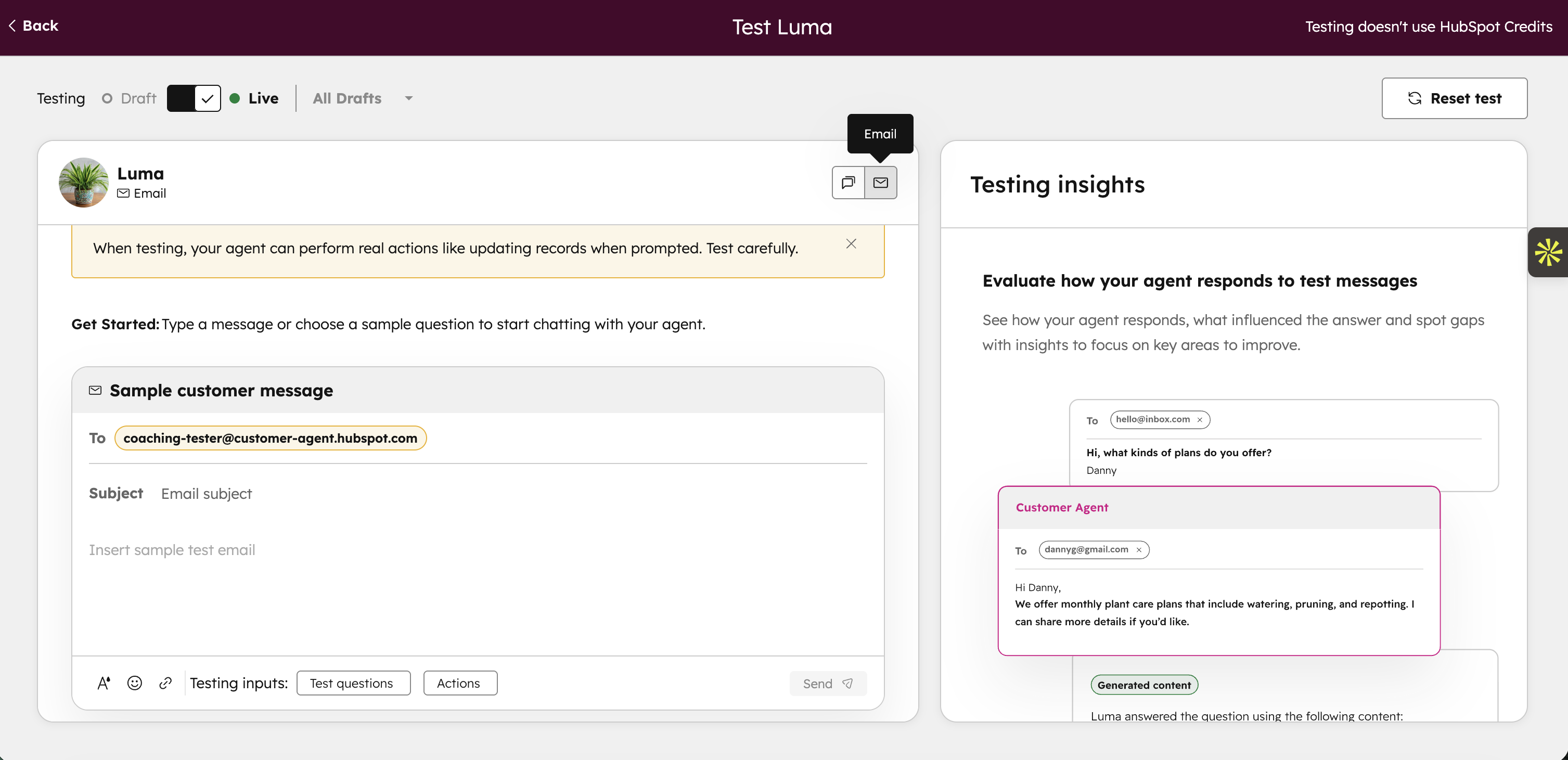
- Select “Email” as the channel in the test environment
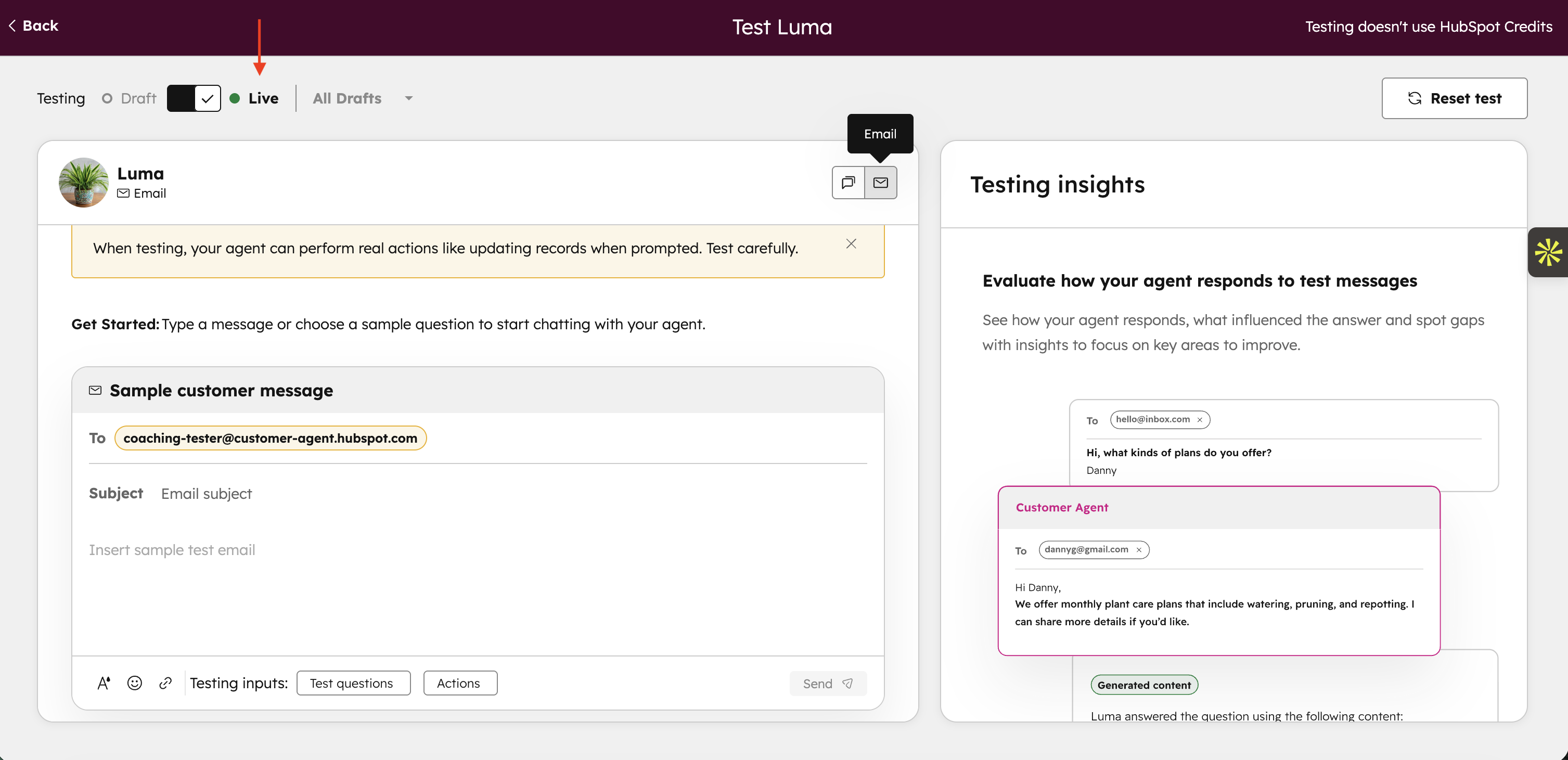
- Choose to test live (current version)
- Write a sample email of a customer question.
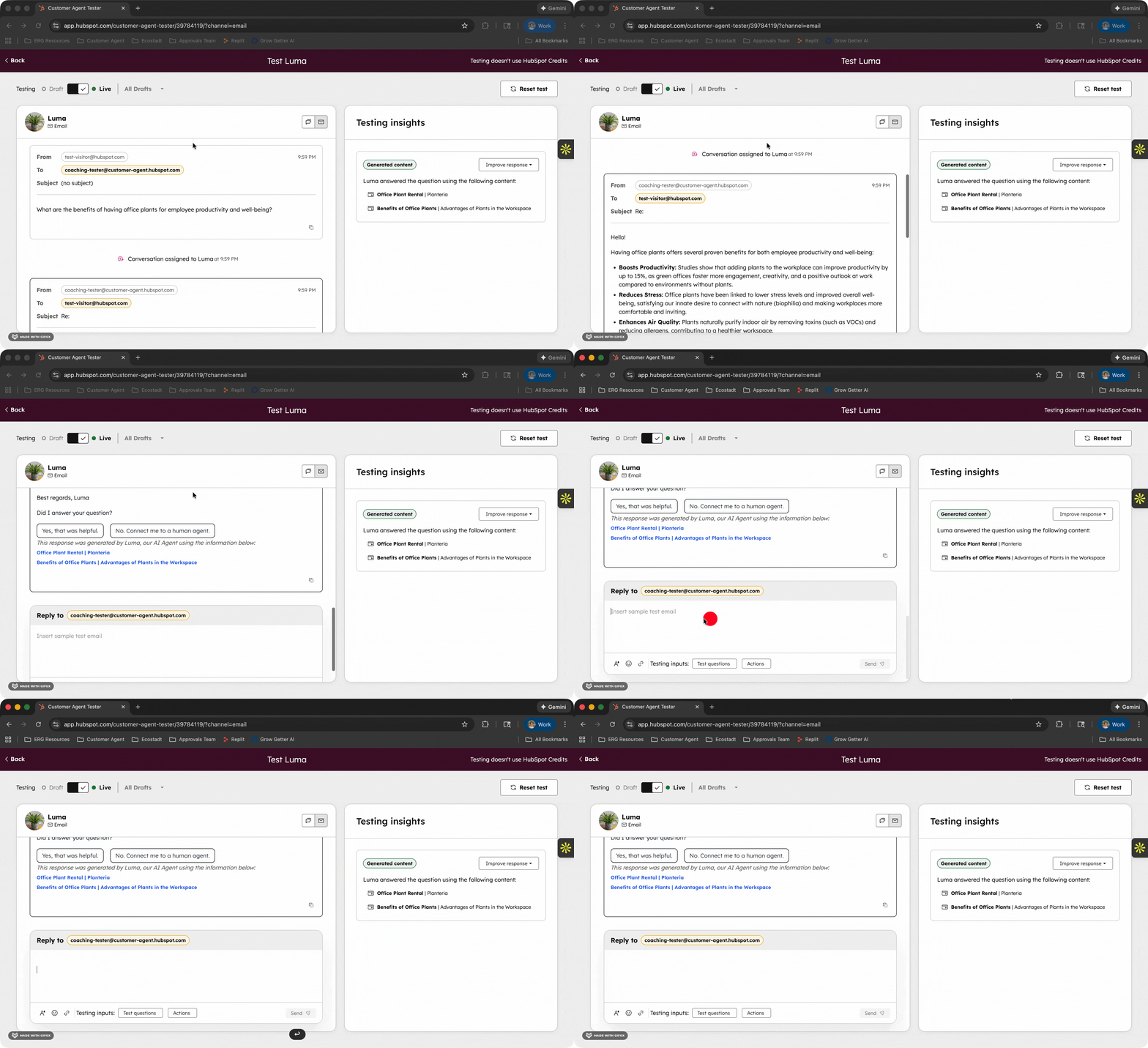
- Send it and view your agent's full response.
- Analyze the use of knowledge sources and improve where necessary by adding a short answer, action, handoff trigger, or new knowledge base article.
- Test with multiple scenarios until you are satisfied.
Availability
HubSpot Credits, Professional & Enterprise Customer Platform, Content Hub Professional & Enterprise, Marketing Hub Professional & Enterprise, Data Hub Professional & Enterprise, Sales Hub Professional & Enterprise, Service Hub Professional & Enterprise
Update 7: How to track followers of your LinkedIn Personal Accounts in HubSpot?
HubSpot Social reporting can now collect and display follower statistics from LinkedIn Personal Accounts. To access this data, you must reconnect your LinkedIn Personal Account(s) to HubSpot.
Why this is important
LinkedIn is offering more and more statistics via the API for Personal Accounts. With this update, you can:
- View more LinkedIn performance statistics directly in HubSpot
- Gain better insight into the growth and engagement of your followers
- Consolidate LinkedIn performance within a single overview, allowing you to report and analyze more effectively
How does it work?
- Reconnect your LinkedIn Personal Account(s) to HubSpot
- HubSpot will receive new API permissions to retrieve follower statistics
- You will now see daily updated follower statistics
Please note: in the week of January 19, 2026, HubSpot will start backfilling follower statistics for the past 365 days for all reconnected accounts. Connect your account(s) before January 19 to include this historical data.
Availability
Professional Customer Platform, Enterprise Customer Platform, Marketing Hub Professional, Marketing Hub Enterprise
Update 8: How to add Custom and Cross-Object Reports to CRM records?
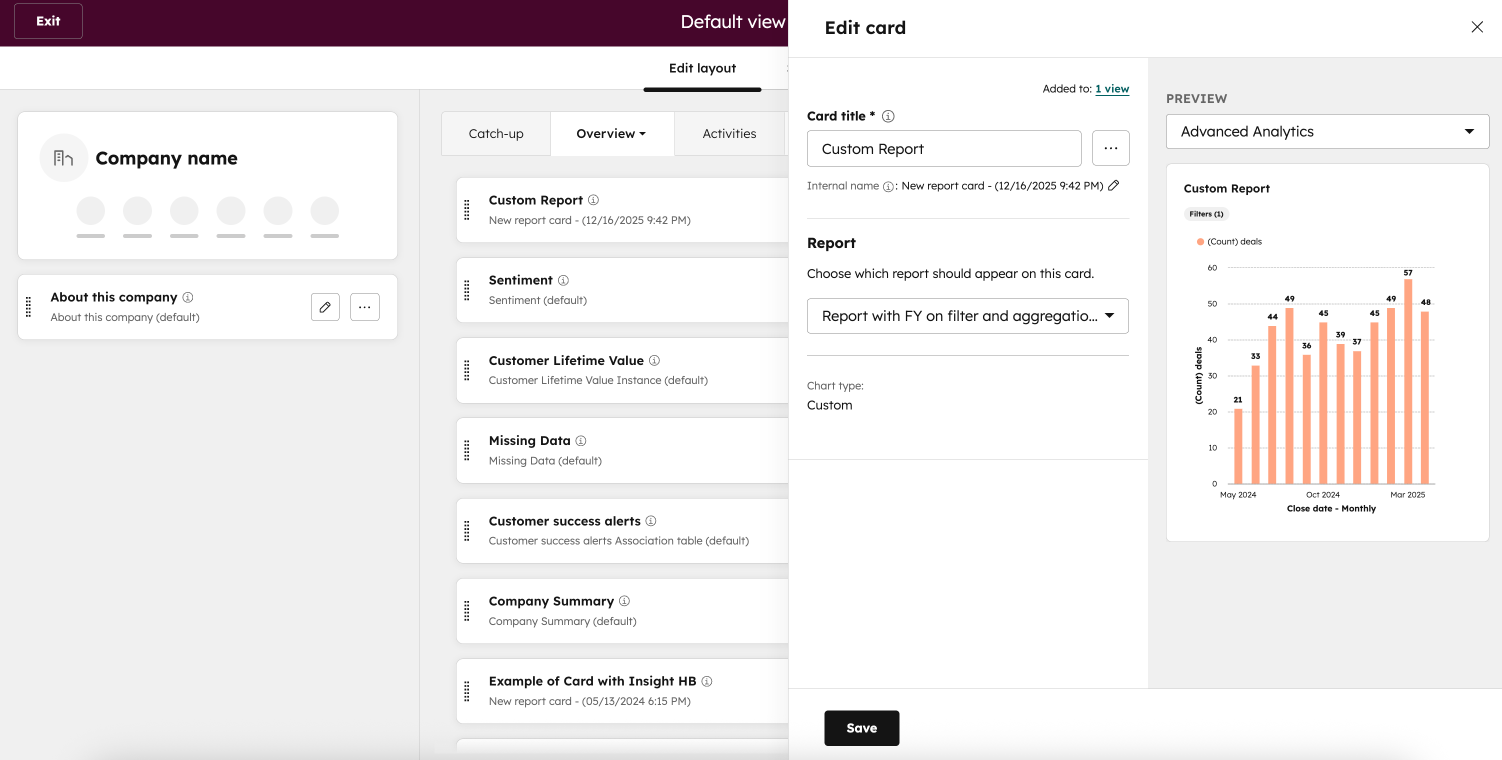
Did you know that you can now integrate advanced report cards directly into CRM records? This allows you to view aggregated data from multiple objects and external sources, giving you a complete overview without leaving the record page.
- How do you add a custom report to a CRM record? – Use record customization, add a Report card, and select your custom report
- How do you filter the data that is displayed? – Choose Subject (current record only), Associations (related records), or Unfiltered (all records for that object)
- What data can you combine? – Multiple objects and external sources, no longer limited to a single object
- How do you configure it? – Add the card to your record views and adjust filters for maximum relevance
Why is this important?
CRM users need contextual insights without switching pages. Single-object reports were a limitation and made it difficult to get a complete picture of customer data. With this update, you have immediate insight into all relevant data, clearly arranged on the same page.
Availability
Commerce Hub Professional & Enterprise, Content Hub Professional & Enterprise, Marketing Hub Professional & Enterprise, Data Hub Professional & Enterprise, Sales Hub Professional & Enterprise, Service Hub Professional & Enterprise, Smart CRM Professional & Enterprise
Update 9: Use formula fields in Custom Report Builder
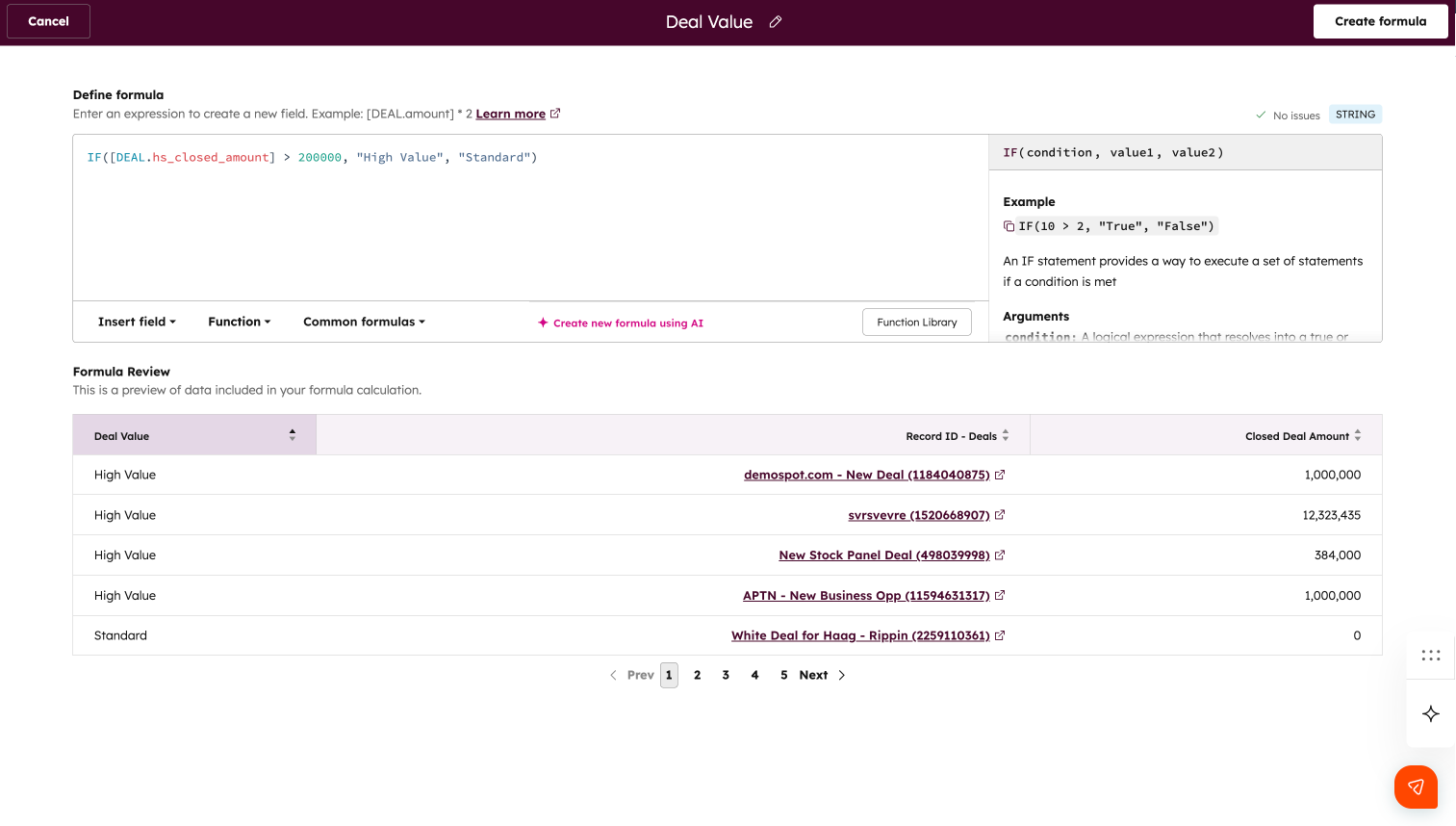
Did you know that with the latest HubSpot update, you can create calculated fields directly in your reports? Formula fields allow you to perform complex calculations, such as conversion rates, custom revenue, or discounts, without exporting data to spreadsheets.
- How do you create a formula field? – Click the new Add button in the Formula fields section of the configuration panel
- How do you build and test a formula? – Use the Formula Builder, choose fields, functions, or let the AI assistant convert a formula in natural language to syntax
- How do you see the result? – Use the preview table to immediately check how your formula works on the data
- Can you customize the formula? – Yes, click on the pencil icon to update the formula
- How do you handle empty values (“No value”)? – You can keep empty values or convert them to zero, depending on your calculation
- How do you use the formula field in a report? – Add it as a column, use it as a filter, drill down, or format it just like any other field
Why is this important?
Formula fields take the work out of HubSpot and make it easier to get real-time insights. For example, you can:
- Perform calculations at the row level for precise data analysis
- Do aggregations without additional exports
- Make faster decisions based on accurate figures
Availability
CMS Enterprise & Pro, Marketing Enterprise & Pro, Operations Enterprise & Pro, Sales Enterprise & Pro, Service Enterprise & Pro
Update 10: How to track the progress of companies through lifecycle stages?
Did you know that you now have four new company properties to see how companies move through their lifecycle? These properties provide insight into the timing and duration of each stage in your sales process.
- What new properties are available?
- Date entered stage – when a company enters a stage
- Date exited stage – when a company leaves a stage
- Latest time in stage – the last time a company was in this stage
- Cumulative time in stage – total time spent in this stage
- How do you use these properties? – Create reports to track company progress or automate workflows based on the time a company spends in a stage
- Are these properties available for custom lifecycle stages? – Yes, they are available for all custom stages you have created
Why is this important?
These properties help you better understand how companies move through your sales process, discover opportunities for optimization, and improve your conversion rates.
Availability
Content Hub Professional & Enterprise, Marketing Hub Professional & Enterprise, Data Hub Professional & Enterprise, Sales Hub Professional & Enterprise, Service Hub Professional & Enterprise, Smart CRM Professional & Enterprise
 Get more out of HubSpot?
Stay up to date via our newsletter, LinkedIn , and HubSpot User Days.
Sign up now!Share this

HubSpot Product Updates: April 2026
HubSpot Product Updates: February 2026